 art
art
art
art
Product study · Interactive
rstew.art / What / FrameChanger
Drag across a device screen to scrub a produced frame sequence. Built so a sponsor can own a playback moment next to a live game, not only sit in a banner beside it.
FrameChanger is a front-end pattern for interactive 360º (or multi-angle) frame sequences. You capture or render an orbit, pack the frames into one sprite sheet image, place that sheet inside a device or product frame, then let someone drag to scrub time and viewpoint.
The Passat mock below is the working proof. Same interaction model that can sit on a streaming companion, a branded overlay, or any surface where the hand should own the sequence instead of watching a loop.
Production builds the frames. The sprite makes them lightweight. The overlay sells the context. Drag turns viewing into control.
The craft is not the scrub alone. It is the production pipeline that makes scrub feel natural the moment a hand touches the surface.
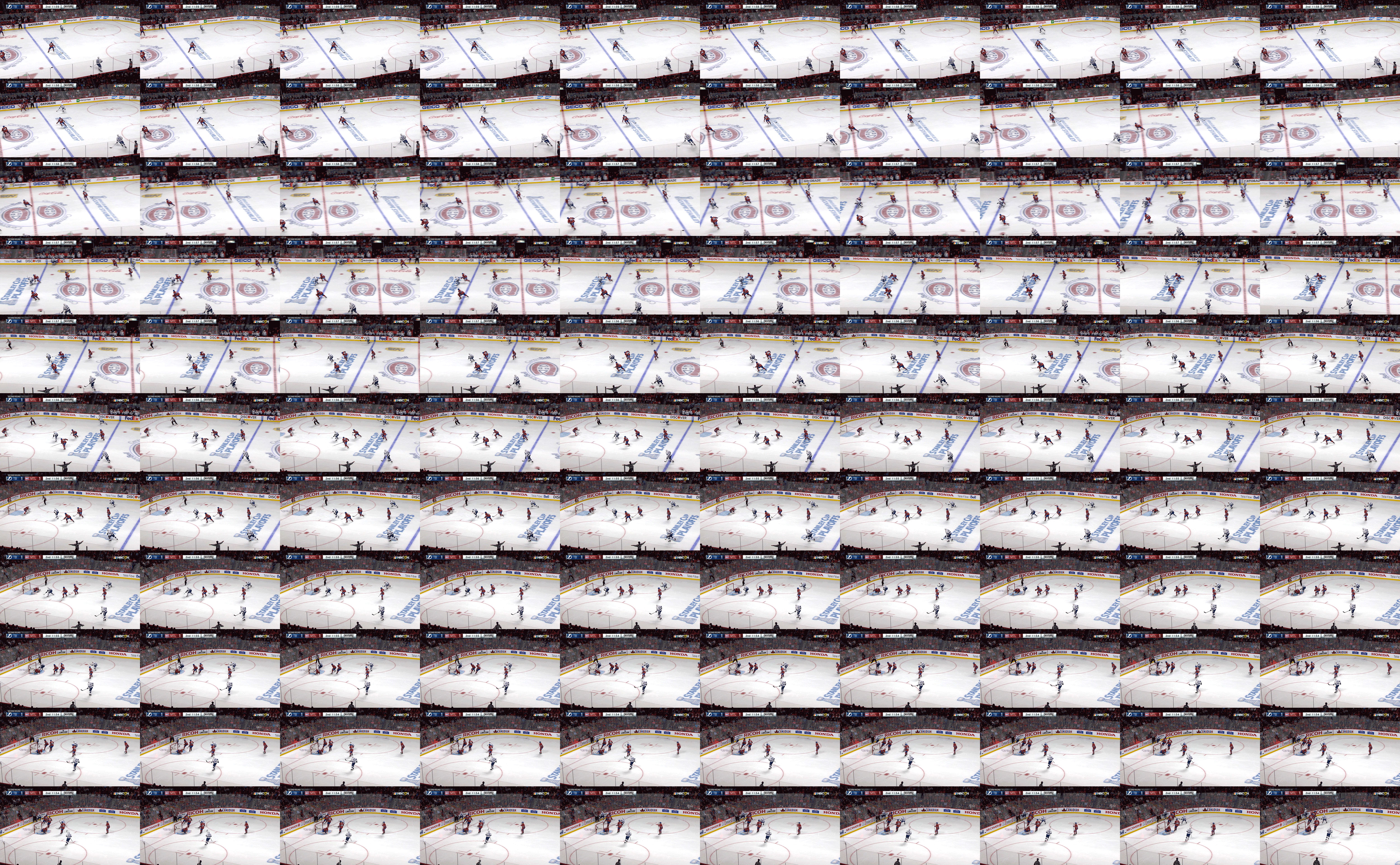
Production
Shoot or render a locked sequence (orbit, replay beat, product turn). Keep framing consistent so each frame lands in the same screen rectangle. For sports playback, this is the beat the advertiser wants the viewer to own: a replay angle, a branded moment, a product in situ during the game.
Sprite sheet
Lay frames into a grid (here: 10 columns × 11 rows = 110 frames). One image request, CSS background-position advances the cell. Compression stays predictable. The sheet is the media asset and the timeline.
Overlay frame
A transparent device or product chrome (passat-frame.png) sits above the sprite window. Screen inset and rotation are measured once (percent + degrees) so the sequence reads as content on a real surface, not a floating rectangle.
Interaction model
Pointer and touch map horizontal delta to frame index. Sensitivity is tuned so a short drag feels responsive without overshoot. Cursor ew-resize and a drag hint set the expectation before the first move.
How the system fits together: asset pipeline, drag-to-frame math, and the sponsor loop around hockey playback.
background-position is the only paint change per move.Drag horizontally across the device screen. You are scrubbing the sprite sequence inside the Passat mock overlay.
Interactive 360º Frame Sequence Prototype · Passat mock
Same interaction shipped on the live examples page. Assets resolve from rstew.art. Gallery flip chrome is optional elsewhere; here the study owns the page.
What the user feels is ownership of time. A video plays at you. A FrameChanger waits for the hand. Drag left, the sequence rewinds. Drag right, it advances. Release, and the frame holds. That hold is the product moment: the still the brand wants, chosen by the person holding the device.
Production has to respect that contract. Frames must be evenly stepped. The sprite grid must be exact. The overlay must clip cleanly so the illusion does not break on a mid-drag. If production is sloppy, scrub feels like a slideshow. If production is tight, scrub feels like turning the object in your hands.
Tied to production: the interaction only works as well as the plate. Capture, layout, compression, and inset math are the UX. The JavaScript is the thin last mile.
Context: NHL digital streaming companion work on NBC Sports (whiteboard through high-fidelity UI, interactive layout). The streaming companion sits beside the game. Sponsors want more than a banner next to the feed. They want a hand in the experience of the play.
FrameChanger is the control surface for that ask. An advertiser funds a produced sequence tied to the game world (a branded replay angle, a product orbit staged against arena light, a beat that lands between periods). That sequence becomes a sprite. The companion embeds FrameChanger so the viewer can scrub the beat themselves while the live game (or the replay) runs in parallel.
The Passat mock is the stand-in object. Swap the plate for a hockey-specific sequence and the same scrub becomes experiential game playback under sponsor control. The companion gallery shows the broader NHL product lifecycle (wireframe → design → walkthrough → live UI). FrameChanger is the piece that turns that product into something the hand can drive during the game.
Story in short: live game on one surface, advertiser-authored frame sequence on the companion, FrameChanger as the dial the viewer turns. Process makes it shippable. Interaction makes it felt.