Concept
The NHL Streaming Companion is a second-surface product that sits beside the live game. Video owns the left. Live stats, rink maps, player deep-dives, timeline events, highlights, and sponsor units own the right and below. The fan does not leave the broadcast to find the data. The data is laid out as a product they can work.
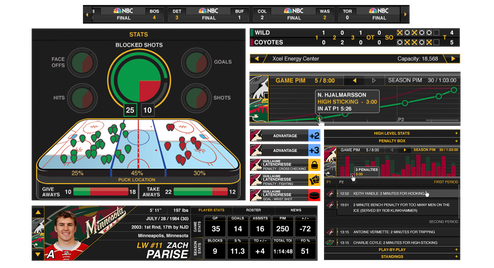
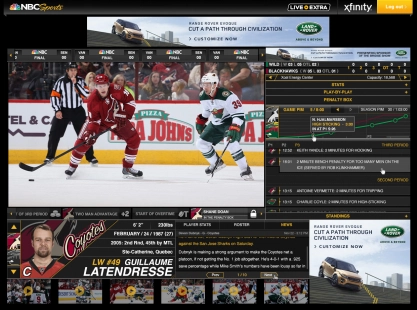
These plates come from the live examples gallery: whiteboard, wireframe, polished UI, and layout behavior for NBC Sports NHL streaming. The gallery shows that path as slides. This study turns it into a process page you can scrub through.
In one line
Wire the companion like a control room for the fan. Live feed stays primary. Every module around it is a handhold into the game.
Working demo
Scrub the process gallery. Same NHL plates as the live examples page, with prev/next, keyboard arrows, drag, and a thumbnail strip.
[interactive · process gallery]
Wireframe · zone lock
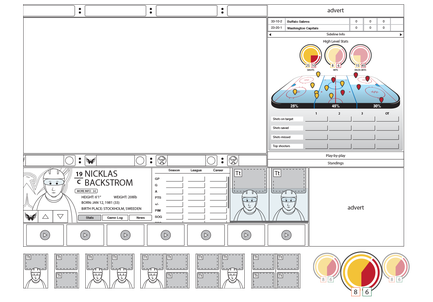
Structural plate: video pane, stats sidebar, player deep-dive, highlight row, and reserved advert slots.
Assets resolve from rstew.art. Interaction mirrors the examples gallery (prev/next + drag), tightened for a study page. Arrow keys work when the gallery is focused.
Prev / Next
Drag · horizontal
Keys · ← →
12 plates
UX and production
What the fan feels is command of the game without leaving the broadcast. The score ticker jumps to other live NBC games. The timeline relives a goal or a penalty and offers GO LIVE to snap back. Fullscreen hides the companion chrome so the play can own the glass. The sidepanel tabs (stats, play-by-play, penalty box) swap density without relocating the video.
Production has to respect that contract. Zones stay consistent from wireframe to live UI so modules can be designed in parallel. Rink maps, gauges, and player cards share a grid language. Ad slots are drawn into the wireframe as structure, so sponsor units land in reserved real estate (leaderboard, square, highlights presented-by) instead of colliding with the feed.
Tied to production: the interaction only works as well as the layout system. Whiteboard density, module craft, and reserved sponsor slots are the UX. The gallery script is the thin last mile that lets a stakeholder scrub the lifecycle.
Product story
Context: interactive product lifecycle for the NHL digital streaming experience on NBC Sports. The companion sits beside the game so the fan can hold video and data at once. Walkthrough plates teach the handholds. Live Extra screens show the assembled product under real broadcast chrome.
Sponsor presence is grounded in the same plates. Leaderboard and square units sit in reserved slots. Highlights carry a presented-by treatment. Adjacent gallery frames show ad-integration sequences for related sports streaming work. The point is not a banner next to a feed. It is a companion surface where brand real estate is part of the product structure from wireframe forward.
What the product ships
- A process path from whiteboard to live companion that stakeholders can scrub.
- Modular data around a primary video surface (score, rink, player, timeline, highlights).
- Interactive layout behaviors designed as product, not chrome (ticker jump, timeline, fullscreen).
- Reserved sponsor slots drawn into the wireframe so experiential ad units sit inside the system.
The examples gallery on rstew.art is the source of truth for the plates. This study is the process-forward reading of that gallery: concept, pipeline, diagrams, working scrub, UX, and the product story that ties the lifecycle together.
Story in short: live game on the primary surface, companion modules as handholds, process plates that prove the path from wireframe to ship. Density is the craft. Interaction is the layout. Sponsors sit in reserved structure.